

- Reads are read-only. Queries from an agent run in the database’s own read-only mode where the engine has one.
- You approve every change. Any change to data waits until you approve the exact statement in FlexTable.
- Local only. The server listens only on your computer. Nothing is sent anywhere else.
- Free. The MCP server is included in every plan.
Turn it on
1
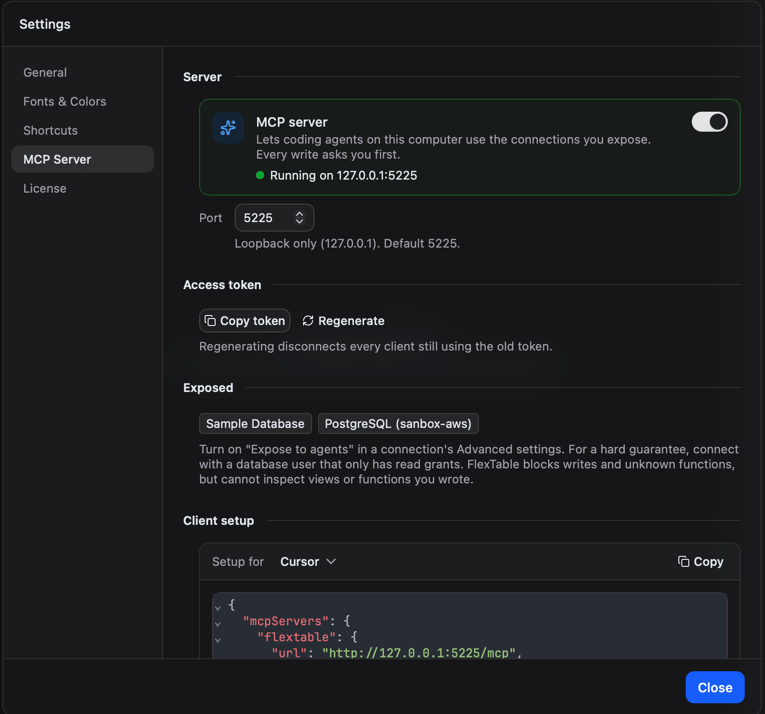
Open Settings, then MCP Server
Turn on the switch at the top. The status line shows Running on 127.0.0.1:5225, or the error if the server could not start (for example, the port is already in use).
2
Choose a port (optional)
You can change the port in the same tab. The server only accepts connections from this computer.
3
Expose a connection
Open the connection you want agents to use, go to the Advanced section of its form, and turn on Expose to agents. Connections are hidden from agents until you do this.
4
Set up your client
In Setup for, pick your client and press Copy. You get a ready-to-paste config with your access token already filled in, plus a line telling you where to paste it.
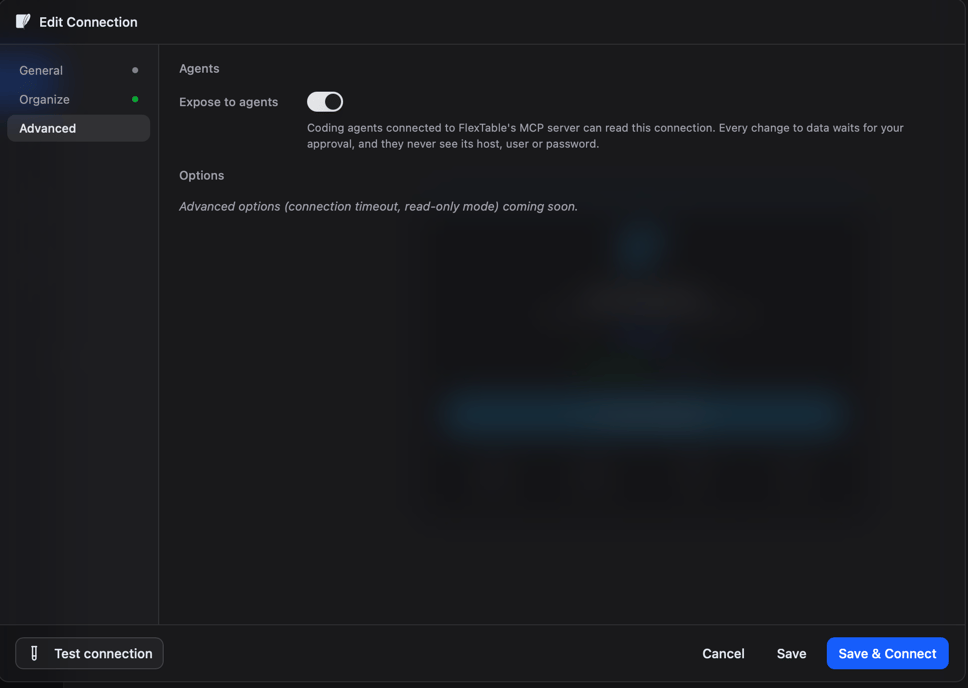
Expose to agents is off by default, and connections you import always arrive with it off. Agents only see the connections you turn it on for.
Access token
Every client needs the access token to connect. Use Copy token to copy it; the token itself is never shown on screen. Regenerate creates a new token and immediately cuts off every client still using the old one. Copy the new config into each client you want to keep using.Supported clients
Pick your client in Setup for, press Copy, and paste the config where the line under it says. The picker groups clients by kind:Gemini CLI. Checking that the connection works does not need you to sign in, but chatting with Gemini needs a Gemini API key or Vertex AI.
- Claude Desktop is not supported yet. It is listed under Desktop app in the picker as coming later.
- ChatGPT can only connect to servers on the public internet, not to one running on your computer.
- JetBrains AI Assistant cannot send the access token, so it cannot connect.
What an agent can do
An agent can list the connections you exposed. It sees only each connection’s name and database engine, never the host, user name, or password.
Read queries may only call the database’s built-in functions. A function you wrote yourself is refused.
Every agent call is recorded in the query history of that connection, so you can review what was run. See Saved queries and history.
Approving changes
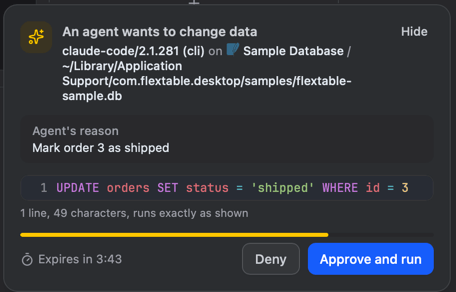
When an agent wants to change data with anINSERT, UPDATE, DELETE, or MERGE, FlexTable asks you first.
-
An approval card appears at the bottom right of the main window, and a badge appears in the title bar. The card does not block the rest of the app.

- The card shows the full statement, the connection and database, which agent asked, the reason it gave, and a countdown. The statement is never shortened: scroll to its end to enable Approve and run.
-
Choose:
- Approve and run runs exactly that statement, once.
- Deny runs nothing.
- Hide tucks the card away without answering. Click the title bar badge to bring it back.
Limits
- Your own views and functions. FlexTable blocks writes and unknown functions, but it cannot see inside views or functions you wrote in your database. For a hard guarantee, connect with a database user that only has read permissions.
- This computer only. Agents on another computer cannot use the server.
- Claude Desktop is not supported yet.
Troubleshooting
Security and privacy
How FlexTable stores your connections and what leaves your computer.