> ## Documentation Index
> Fetch the complete documentation index at: https://docs.flextable.dev/llms.txt
> Use this file to discover all available pages before exploring further.
# Manage connections
> Organize connections into folders, favorite them, and edit, duplicate, or remove them from the Home screen.
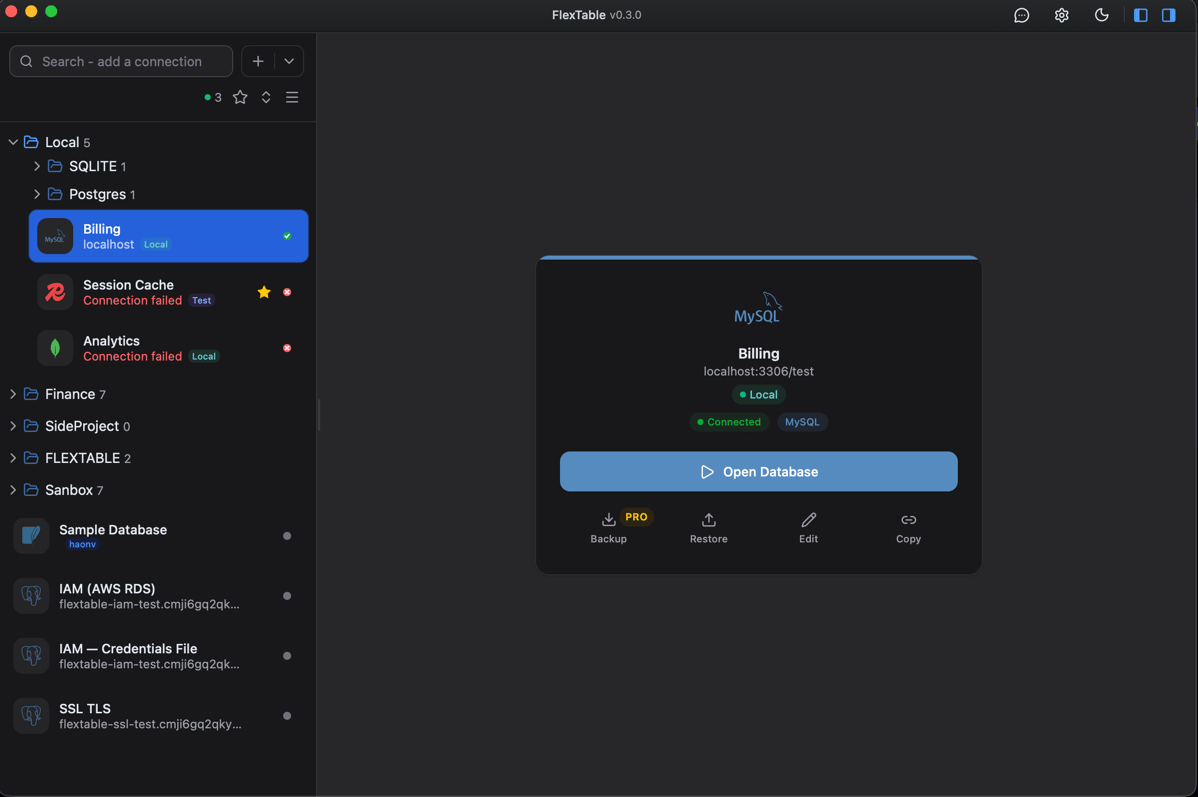
The **Home** screen is your connection manager. It lists your connections with their status and gives you quick actions on each one.
 ## Organize
* **Folders and groups** - group related connections (for example by project or environment) so a long list stays tidy.
* **Favorites** - star the connections you open most.
* **Search** - filter connections by name.
* **Status** - each connection shows whether it is reachable at a glance.
## The connection card
Select a connection to see its detail card with one-click actions:
* **Open Database** - jump into the workspace.
* **Backup** and **Restore** - snapshot or restore the database ([PRO](/backup-and-restore)).
* **Edit** - change the connection settings.
* **Copy** - duplicate the connection as a starting point for a similar one.
## Edit, duplicate, delete
Right-click a connection in the sidebar for the full context menu (edit, duplicate, delete). FlexTable auto-reconnects when a connection drops.
Add SSL/TLS, an SSH tunnel, or AWS RDS IAM auth.
## Organize
* **Folders and groups** - group related connections (for example by project or environment) so a long list stays tidy.
* **Favorites** - star the connections you open most.
* **Search** - filter connections by name.
* **Status** - each connection shows whether it is reachable at a glance.
## The connection card
Select a connection to see its detail card with one-click actions:
* **Open Database** - jump into the workspace.
* **Backup** and **Restore** - snapshot or restore the database ([PRO](/backup-and-restore)).
* **Edit** - change the connection settings.
* **Copy** - duplicate the connection as a starting point for a similar one.
## Edit, duplicate, delete
Right-click a connection in the sidebar for the full context menu (edit, duplicate, delete). FlexTable auto-reconnects when a connection drops.
Add SSL/TLS, an SSH tunnel, or AWS RDS IAM auth.